PDF OCR
Add a searchable English text layer to a scanned PDF, then compare the downloaded result with your original before relying on the recognized text.
Upload a scanned PDF
Run OCR on scanned PDFs to create a searchable PDF. Best for scanned documents, image-based PDFs, forms, and receipts. Files auto-delete after 1 hour.
Drag and drop a file here, or click to browse.
Make scanned English text searchable, then verify it
A scanned PDF often stores each page as an image, so the letters are visible but cannot be searched or selected as normal text. This tool runs optical character recognition on the server and creates a new PDF with recognized text associated with the page images.
OCR is an interpretation of the scan, not a guaranteed transcription. Keep the original file and compare names, dates, amounts, reference numbers, and other important content before using the result.
Upload one PDF
Choose a scanned or image-based PDF that you are authorized to process.
Run English OCR
The server analyzes eligible page images and builds searchable text.
Download the copy
Save the generated standard PDF while keeping your original unchanged.
Verify the result
Compare page appearance and important recognized text before using it.
What the production test supports
- English OCR on clean, degraded, and sideways scanned pages
- Searchable output text for the tested scan controls
- Standard PDF 1.7 output rather than PDF/A conversion
- Retention of the tested attachment and selected metadata
Important limitations
- English only, with recognition errors still possible
- Pages with native text may be skipped, including raster text on them
- Visual orientation and other PDF features may change or remain uncorrected
- Signed and encrypted PDFs are refused by the tested workflow
Tested with clean, degraded, sideways, and mixed-page controls
Reviewed by PDF Toolbox. Tested August 6, 2026 (UTC) against the live production APIs in one four-page synthetic job. The runtime used OCRmyPDF 16.13.0 and Tesseract 4.1.1. Separate signed and encrypted controls confirmed the refusal behavior.
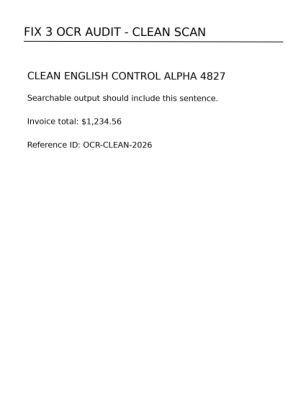
The clean control sentence, invoice amount, and reference ID were recognized in the downloaded production output.
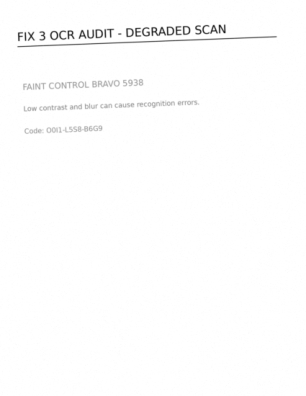
The faint control words were recognized, but one ambiguous code was read differently. Low contrast and blur can reduce accuracy.
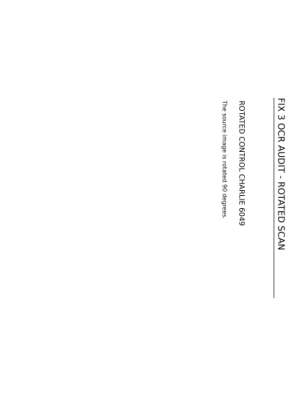
The sideways control text became searchable, while the visible page remained sideways in this tested output.
Production test results
These observations describe the published synthetic files. They do not guarantee the same result for every scan or PDF structure.
| Check | Observed result | Status |
|---|---|---|
| Clean scan | Control sentence, amount, and reference ID were recognized. | Passed |
| Degraded scan | Main controls were recognized; an ambiguous code contained an OCR error. | Passed with error |
| Sideways scan | Control text became searchable; visible content remained sideways. | Passed with limitation |
| Mixed page | Native text remained; raster text on the same skipped page was not recognized. | Expected limitation |
| Output format | Downloaded output was ordinary PDF 1.7 with no PDF/A identifier. | Passed |
| Metadata and attachment | The tested attachment and selected document fields remained. | Observed in test |
| Signed and encrypted controls | Both were refused and no partial output remained. | Passed |
| Scheduled retention | Eligible upload, output, and preview test directories were deleted. | Passed |
Verify the OCR output before relying on it
- 1. Keep the original PDF as the authoritative source.
- 2. Compare names, dates, amounts, codes, and other important text.
- 3. Inspect every page for visual, orientation, or layout changes.
- 4. Check links, forms, annotations, accessibility, and attachments when relevant.
This tool and its production report are not a transcription guarantee, archival certification, legal review, or proof that every PDF feature was preserved.
File retention
Uploaded PDFs, generated outputs, and page-preview images become eligible for scheduled deletion after 60 minutes. Cleanup runs every five minutes, so removal may occur shortly after the eligibility threshold rather than at exactly 60 minutes.
FAQ
What does this PDF OCR tool do?
The tool sends one PDF to the server and runs English OCR to add searchable text to scanned page images. The downloaded file remains a PDF. OCR can help with search, selection, and copying, but it does not guarantee a correct transcription or preserve every PDF feature.
Which OCR languages are supported?
The current interface processes English only. It does not offer a language selector or promise reliable recognition for other languages.
How accurate is the recognized text?
Accuracy depends on the source. Clean, high-contrast machine print usually performs better than faint text, blur, handwriting, unusual fonts, background noise, or complicated layouts. In our production test, a degraded control code was recognized differently even though the main control words were found. Compare important text with the original.
What happens when a page already contains selectable text?
The current production configuration uses OCRmyPDF's skip-text behavior. A page that already contains native PDF text may be skipped rather than having its image regions OCR-processed. In our mixed-page test, the native text remained searchable while separate raster text on that same page was not recognized.
Does OCR preserve the original PDF exactly?
No exact-preservation promise is appropriate. OCR adds or rebuilds PDF content and the production process also uses deskewing, cleaning, and optimization. The tested output was an ordinary PDF 1.7 file, not PDF/A. Keep the original and inspect page appearance, text, links, forms, annotations, accessibility, signatures, and any other important features.
What happens to signed or password-protected PDFs?
The production test refused a digitally signed PDF because OCR would invalidate its signature, and it refused an encrypted or password-protected PDF until protection is removed. Both test jobs failed without leaving a partial output file.
Are metadata and embedded attachments preserved?
The tested attachment and selected title, author, subject, and keyword fields remained in the controlled output. That observation applies to the published synthetic file only and is not a guarantee that every attachment, metadata field, annotation, form, layer, or other PDF structure will remain unchanged.
When are uploaded and generated files deleted?
Uploads, generated outputs, and page previews become eligible for scheduled deletion after 60 minutes. Cleanup runs on a five-minute interval, so deletion is not guaranteed at the exact 60-minute mark.